.webp?width=120&height=85&name=Relentless-Digital%20(1).webp)
TL;DR (Quick Guidelines)
-
Upload images only to your provided Google Drive folder
-
Only upload images that are approved and ready for use
-
Do not upload large batches for us to sort through
-
Use high-quality images (no screenshots or low-resolution files)
-
PNG, JPEG/JPG, SVG, GIF or WebP formats only
-
Use landscape images for most content (portrait for headshots only)
-
Keep subjects centered with space around them (not zoomed in)
-
Provide 3–5 real photos per service (no stock if possible)
-
Crop images yourself if needed
-
No advanced edits (we don’t add/remove objects)
-
If an image should not be used, remove it from Drive and notify us
How to Provide Images
Google Drive Folder Structure
When you get started with us, we will provide a Google Drive folder for uploading your images.
-
Inside, you’ll find organized subfolders for different categories (services, team, trucks, etc.)
-
Please upload images into the appropriate folders so our team can easily locate and use them
-
This folder serves as the source of truth for all approved website images
Images = Approved for Use
Any image uploaded to your folder will be considered approved for use on your website.
-
Do not upload large, unfiltered batches of images
-
Only include images you are comfortable having on your site
-
Remove any images you do not want used
If something changes (ex: employee leaves, branding updates, etc.):
-
Let our team know so we can remove it from the website
-
Also delete it from your Google Drive folder
Image Requirements
File Types
- SVG (best for logos and icons)
- PNG
- JPEG / JPG
- WebP
- GIF
- Do not send images inside PDFs. We’re unable to extract or use images from PDF files.
- If possible, send original image files rather than screenshots for the best quality.
Resolution & Quality
-
Provide the highest resolution version available
-
Avoid:
-
Screenshots
-
Thumbnails
-
Compressed or low-quality files
-
Orientation
Landscape (Horizontal) is preferred for most images.
Portrait (Vertical) is only recommended for:
-
Team member photos (headshots)
Visual Example: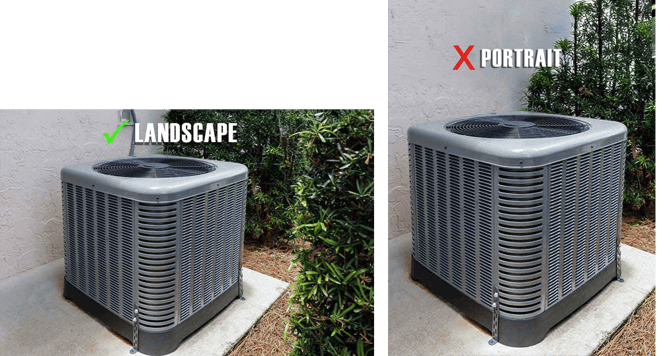
Subject Positioning
Center the Subject with Adequate Spacing
Position the main subject near the center of the image, with enough space around it. Avoid zooming in too close, as important parts may get cropped on different screen sizes.
This ensures:
-
Important details are not cropped on different screen sizes
-
Better responsiveness across devices
Visual Example: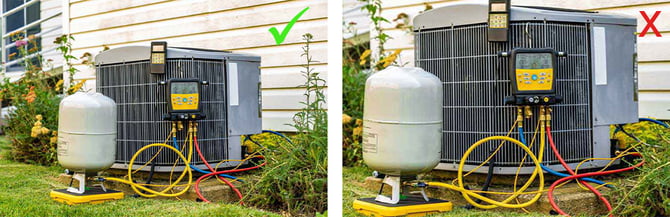
Camera Quality
If using a phone:
-
Use the highest resolution setting
-
Enable high-quality formats (HEIF/RAW if available)
-
Clean your camera lens before taking photos
Types of Images We Need
Service Page Images
For each service, we recommend:
-
3–5 photos
These should include:
-
Technicians at work
-
Equipment
-
Vehicles
-
Real job sites
Important:
We strongly prefer real images from your business over stock photos.
Team & Branding Images
-
Team members
-
Owners
-
Trucks and branded vehicles
Professional photography is highly recommended for these to create a polished, consistent look.
Action & On-Site Photos
Phone photos are perfectly acceptable for:
-
Technicians at work
-
Job site activity
Just make sure:
-
Lighting is clear
-
Background is not overly cluttered
-
Subject is in focus
-
Camera is steady
Image Editing Guidelines
Cropping
If you only want part of an image used:
-
Please crop it before uploading
Example:
-
If two vehicles are in the photo but only one should be shown, crop it accordingly before providing it
Editing Limitations
We do not perform advanced image manipulation such as:
-
Adding or removing major elements
-
Moving objects into different backgrounds
-
Creating composite images (ex: placing a truck in a new setting)
Image Usage Policy
Where We Get Images From
We will only use:
-
Images you provide in your Google Drive folder
-
Our approved stock image library (limited)
We do not pull images from:
-
Google Business Profile
-
Facebook or social media
-
Other online sources
This ensures:
-
Accuracy
-
Brand consistency
-
No accidental use of outdated or unwanted images
AI and Stock Images During Website Development
We use stock and AI images sparingly. Our library is intentionally limited and we encourage you to submit real photos from your business which will always produce better results.
If we haven't received your photos by 3 business days before your homepage review, we may use temporary placeholder images representative of your industry (for example, a general HVAC service scene) so your build can stay on schedule. These placeholders may include:
- Stock photography, or
- AI-generated images
Placeholder images are never a claim about your specific staff, vehicles, or work, and never use your business name, logo, or branding beyond what you've approved. They are used only to avoid delaying your launch.
Image Replacement Options
Placeholder images are temporary and are not intended to be refined or customized. We do not edit, revise, or regenerate stock or AI-generated placeholder images. If a placeholder doesn't work for your site, the best path is to provide your own photo and we'll swap it in.
If you provide your own photos, we'll replace them, typically within our standard revision turnaround if the site is still in development. If the site is live, your CSS will submit a ticket for us to replace them.